An independent benchmark lab, Artificial Analysis, ran Claude's two newest models through the same set of tasks in the days after Sonnet 5.5 launched, and the cheaper model lost on price.
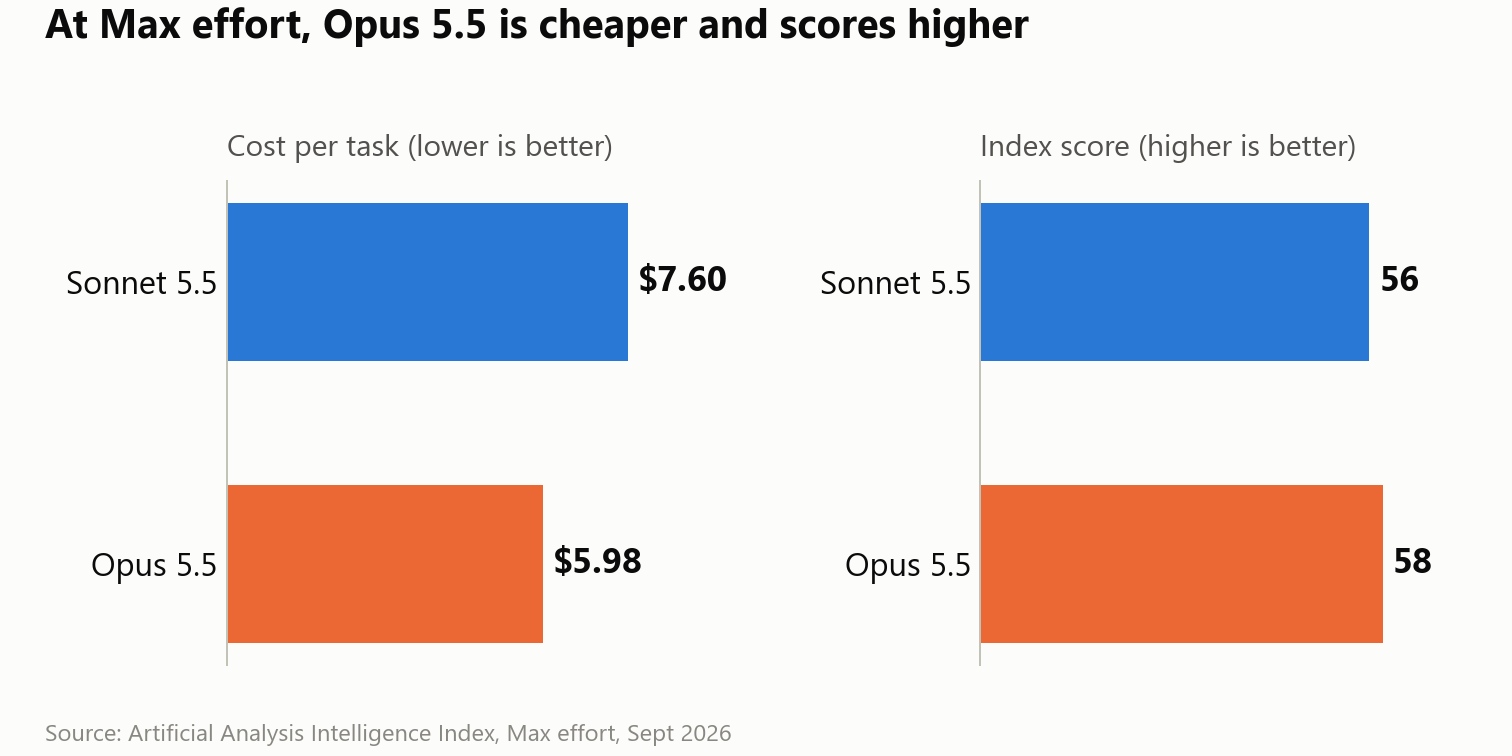
At its maximum effort setting, Sonnet 5.5 cost $7.60 per task on its Intelligence Index. By contrast, Opus 5.5, the model with the higher price tag, cost $5.98 per task at the same setting.
Of course, that sounds backwards, because Sonnet 5.5 charges exactly half of what Opus 5.5 charges for every token. However, once you see why it happened, you'll know which model to open for each job, and then you'll stop paying for power that you don't use.
Why half-price tokens don't guarantee a half-price bill
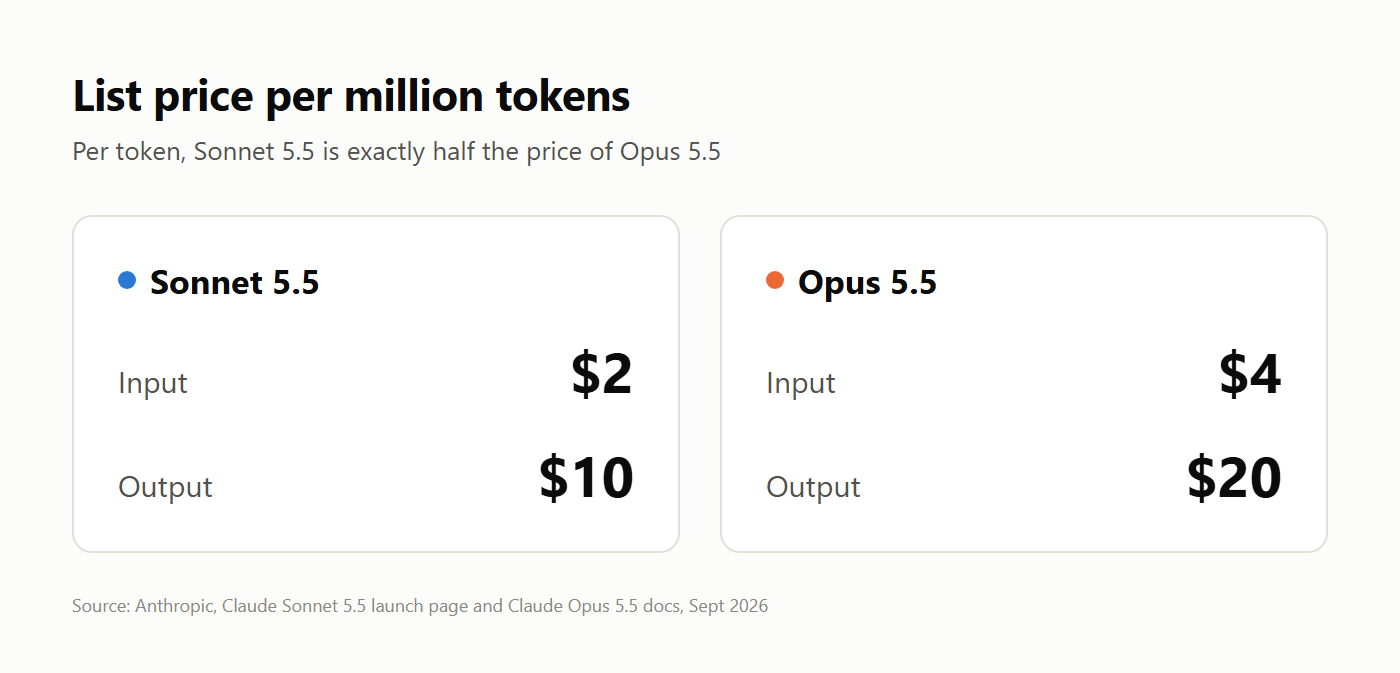
Sonnet 5.5 costs $2 per million input tokens and $10 per million output tokens, while Opus 5.5 costs $4 and $20, so on paper Sonnet wins every comparison.
The trouble is that your bill depends on how many tokens the model produces while it works through your request, and that count includes the thinking it does before it even answers.
See, both models think before they reply, and there is an effort setting that controls how hard they think. There are five levels: low, medium, high, xhigh and max. Accordingly, more effort means the model reasons for longer and checks its own work more thoroughly, which puts more tokens on your bill.
The "definition of done" rule
When a task has a clear finish line, Sonnet 5.5 is the right call. Anthropic's own launch page says Sonnet 5.5 is "strongest at well-scoped everyday tasks, fixing bugs, and creating polished documents, slides, and spreadsheets."
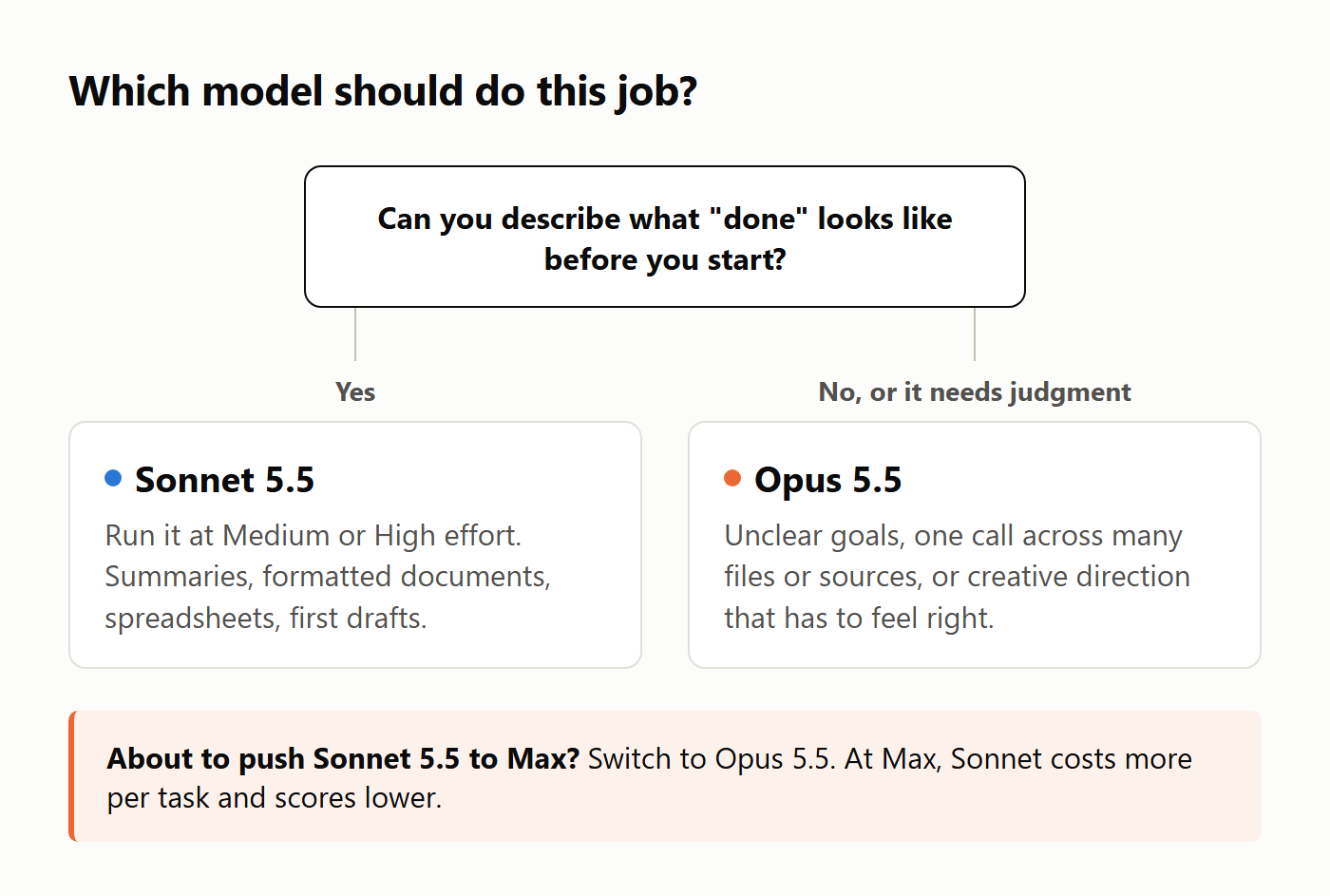
Hold on to the phrase "well-scoped." If you can describe what finished looks like before you start (a one-page summary of a long report, say, or a spreadsheet formatted to a template you already use), you're giving the model a target it can hit without long deliberation.
This is also where the effort setting works in your favor. Artificial Analysis measured Sonnet 5.5 at $0.59 per task on Medium and $1.08 on High and since Medium is the default in Claude Code and the Claude apps, if you use Claude through the app, you're already on the cheaper setting.
Try this yourself: Summarize the same 10-page PDF into a one-page brief with Sonnet 5.5 and with Opus 5.5 in the Claude app. Compare the quality, and note how much of your usage limit each one takes.
"Max effort" comes with an unexpected cost
Now look at what happens when you turn the dial all the way up.
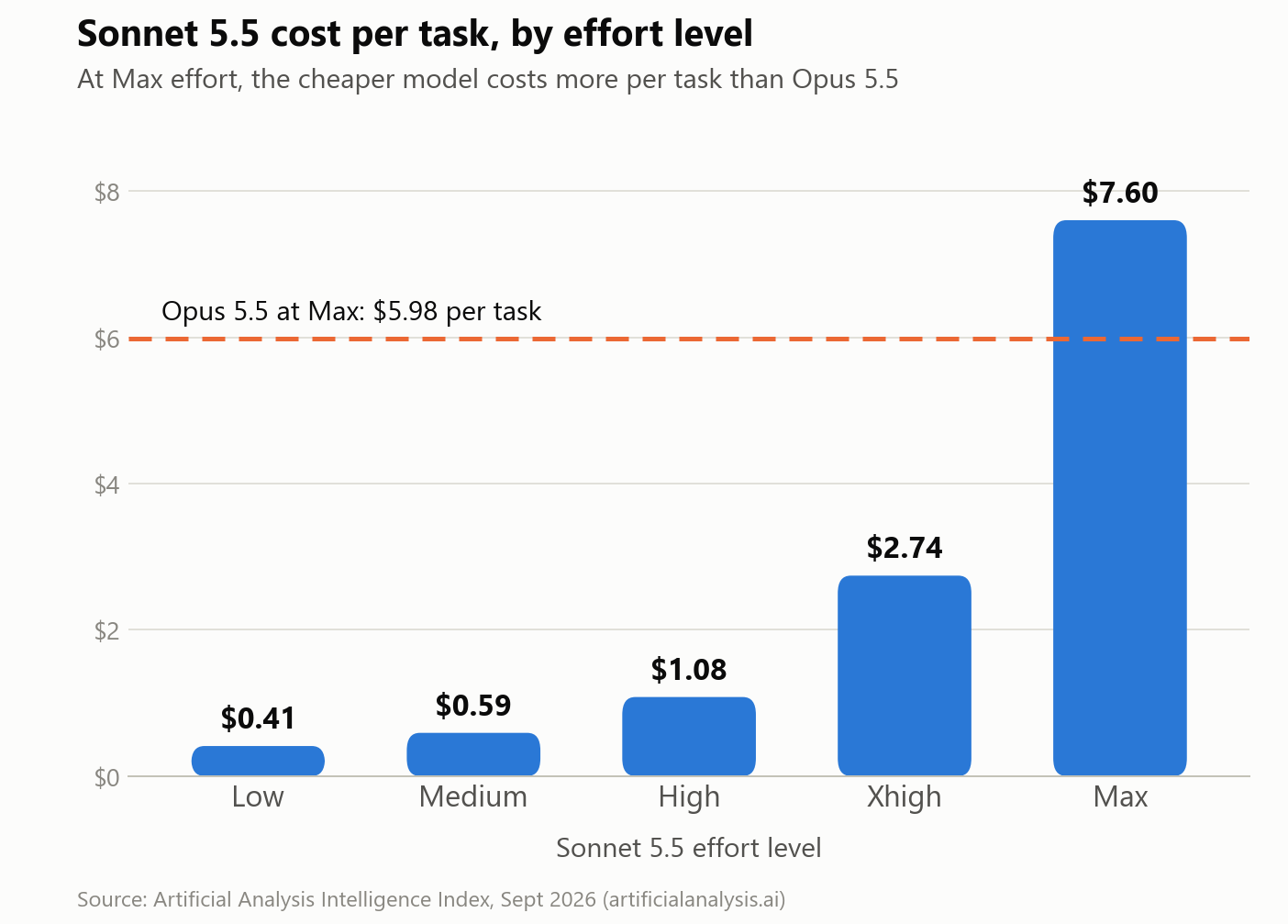
Sonnet 5.5's cost climbs from $1.08 per task at High to $2.74 at Xhigh and $7.60 at Max, roughly seven times the High price. At Max, it produced about 193,000 output tokens per task, which Artificial Analysis called "the highest token use we have measured" and about 60% more than Opus 5.5 used at the same setting.
Even with all that spending, Sonnet 5.5 at Max scored 56 on the index, while Opus 5.5 at Max scored 58. Pushed to its limit, the cheaper model cost more and still scored slightly lower.
Anthropic says much the same thing on its launch page: Sonnet 5.5 "complements Opus 5.5 best when running at lower effort settings, where it costs less per task. At higher settings, it can perform comparably at a similar cost." Artificial Analysis reached a matching conclusion, and rated High as Sonnet's most competitive setting.
There's a trap to watch for though: if a task is hard enough that you find yourself pushing Sonnet 5.5 up to Max, you've reached the point where Opus 5.5 is usually the cheaper choice.
When Opus 5.5 earns its price
Paying double per token makes sense for a smaller set of jobs. In fact, Anthropic describes Opus 5.5 as built for "complex work requiring careful judgment", and its own benchmark table shows a modest Opus lead on coding and reasoning: 54.4% on FrontierCode against Sonnet 5.5's 52.1% at Xhigh (and 46.2% at Max), and 67.7% on Humanity's Last Exam against 64.5%.
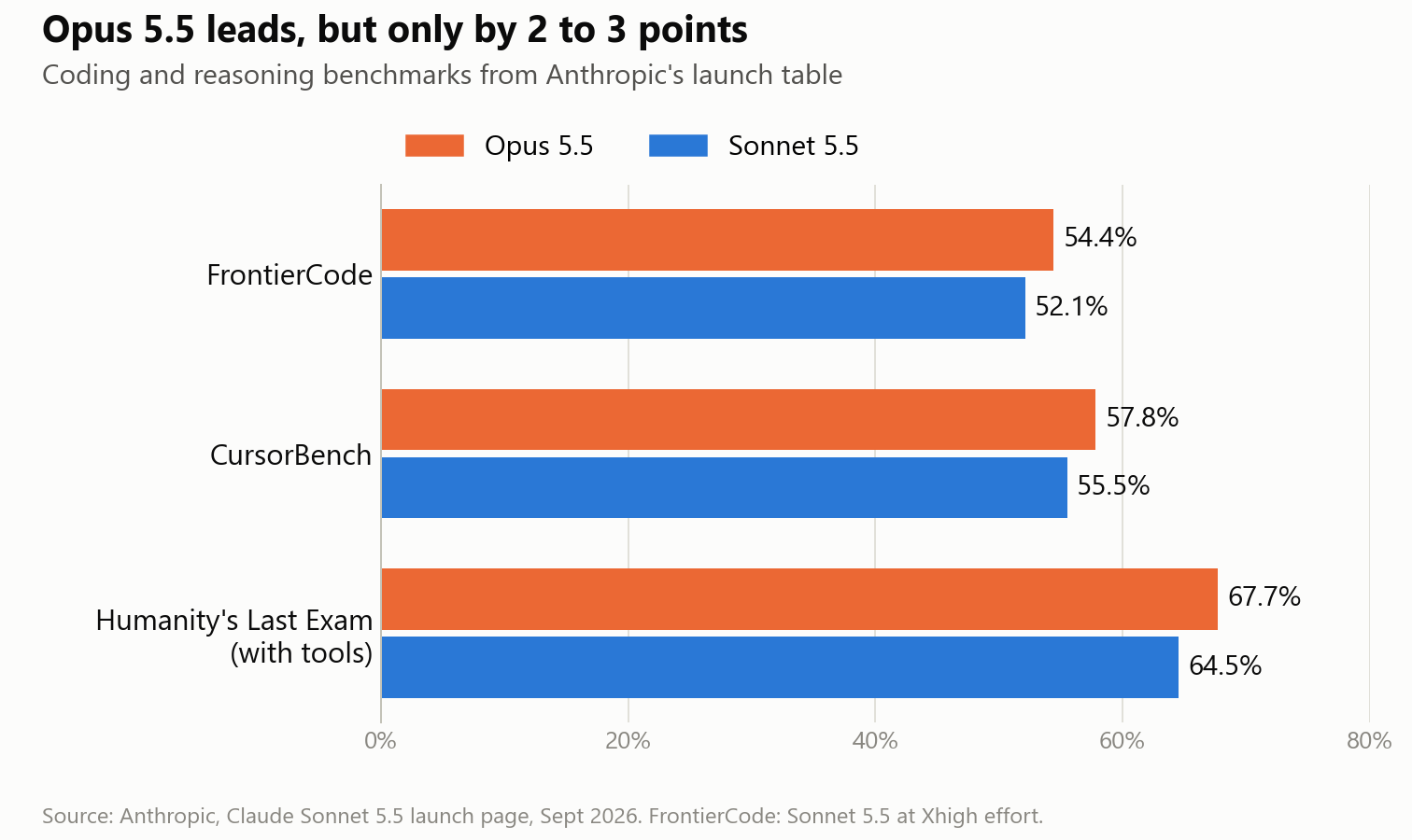
On knowledge work though, the gap nearly disappears. On GDPval-AA, a benchmark built from that kind of task, Opus 5.5 scored 1846 and Sonnet 5.5 scored 1844.
These are the signs that a job belongs with Opus 5.5:
- You can't yet describe what finished looks like, and you need the model to help you work out the goal.
- The task asks for one judgment call across many files or sources at once.
- Creative direction matters more to you than speed, for example when you want a brand voice or a page design to feel right.
Try this yourself: Give both models the same open-ended creative brief, such as a landing page for one of your products with no style guide, and count how many rounds of correction each one needs.
Start on Sonnet, switch before Max
Start every job on Sonnet 5.5 at Medium or High effort. If the result is good, you've paid half the per-token price and kept the difference.
Then, move to Opus 5.5 when the job is ambiguous or needs judgment, and treat the urge to push Sonnet to Max as your cue to switch. By Artificial Analysis's numbers, Sonnet 5.5 at Max already costs more per task than Opus 5.5 and scores two points lower.
Try this yourself: For one week, write down which model and effort level you used for each task, and roughly how much of your plan's usage it took. After a week, the log shows you how your own work splits between the two models.
If this helped you stop paying for power that you don't use, grab the free Which AI for Which Job card. It's a two-page guide to picking the right model and setting for each job, and it comes with the Bankable AI newsletter, which sends you one AI use case that we've tested ourselves each week. Get the free card here.
Sources
- Anthropic, "Introducing Claude Sonnet 5.5"
- Anthropic, "Introducing Claude Opus 5.5"
- Claude Platform Docs, Claude Opus 5.5 overview
- Claude Platform Docs, Migrating to Claude Sonnet 5.5
- Artificial Analysis, "Claude Sonnet 5.5 reaches #2 on the Artificial Analysis Intelligence Index"
- Artificial Analysis, Claude Opus 5.5 model page
- Artificial Analysis, Claude Sonnet 5.5 release comparison